Sather Tower, UC Berkeley


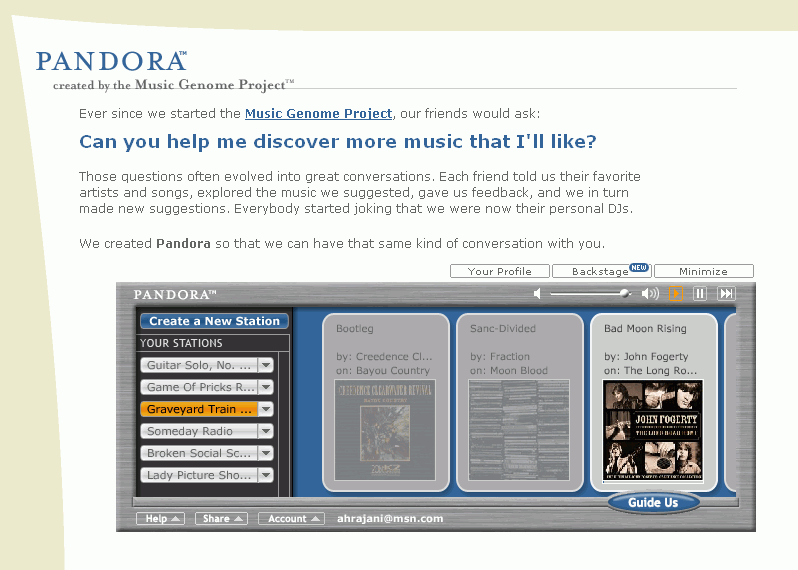
Together we set out to capture the essence of music at the most fundamental level. We ended up assembling literally hundreds of musical attributes or "genes" into a very large Music Genome. Taken together these genes capture the unique and magical musical identity of a song - everything from melody, harmony and rhythm, to instrumentation, orchestration, arrangement, lyrics, and of course the rich world of singing and vocal harmony. It's not about what a band looks like, or what genre they supposedly belong to, or about who buys their records - it's about what each individual song sounds like.
Over the past 6 years, we've carefully listened to the songs of over 10,000 different artists - ranging from popular to obscure - and analyzed the musical qualities of each song one attribute at a time. This work continues each and every day as we endeavor to include all the great new stuff coming out of studios, clubs and garages around the world.


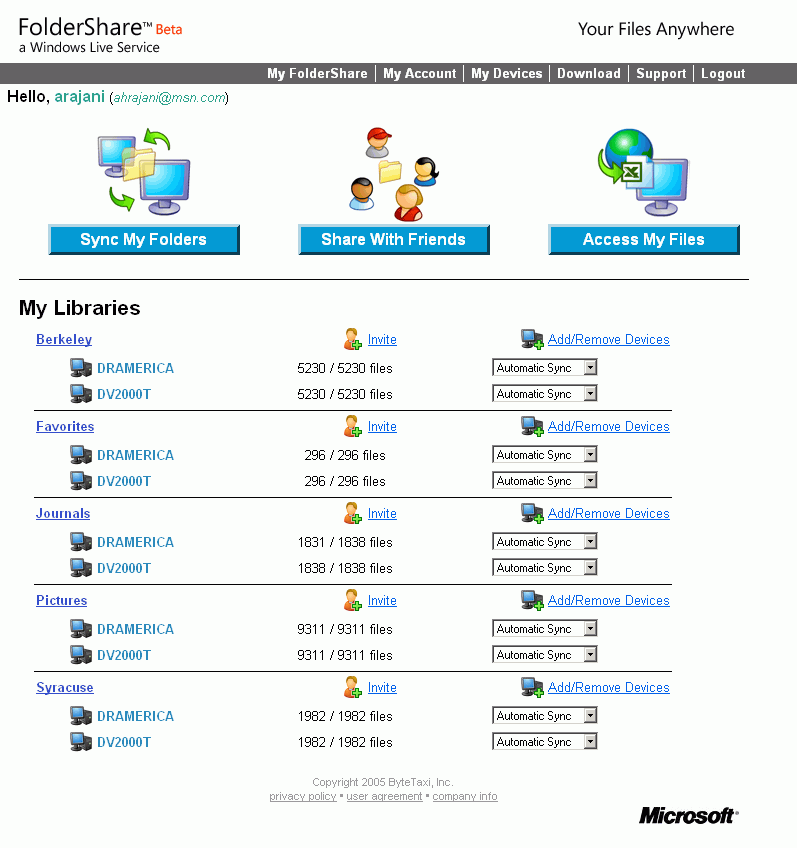
You can share files up to 2GB in size, which is amazing. And because your computers are serving files to each other, you have unlimited file transfers with no limits on quantity of files transferred. You can also sync any file type in their original format.Synchronize all your devices - Retrieve work files at home or
access photos at work. With your devices in sync, you no longer have to be
frustrated that your information is on another computer.Share files, photos, and home videos with your peers - Select
the content you want to share, invite members, and they will be able to access
the shared files directly from their device.
Access your computer or device remotely - FolderShare mobile
access allows you to access your computer from any web browser.
We can't find flights to match your request. This may be because:
The flights are full on the date you selected. Search again?We're not selling seats yet on the date you selected. Currently, we're selling seats for all destinations through January 08, 2007. Please check back again soon for flights after that date.
You've selected a city we don't serve yet.
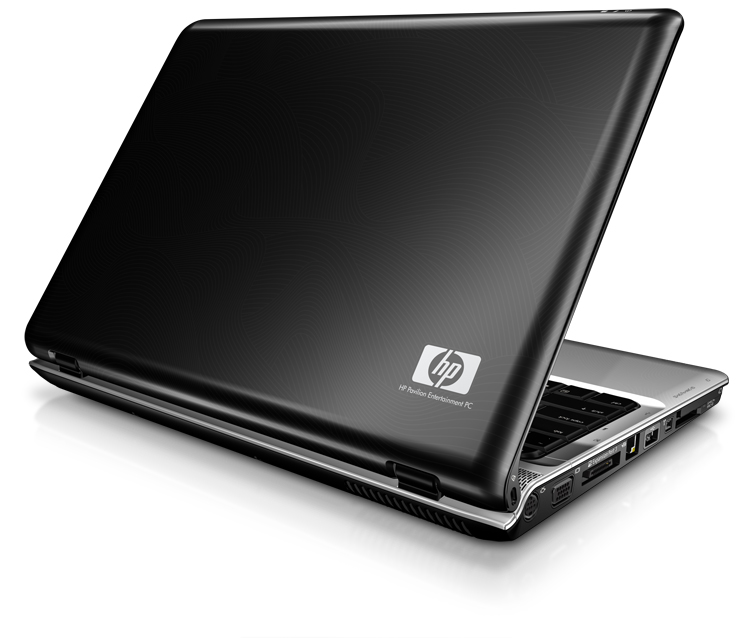 My famed road warrior, the Sony VAIO R505 GC, is finally getting a long deserved rest. After four years of intense use, I've decided to purchase HP's brand-spanking new notebook, the DV2000t. This notebook replaces HP's DV1000 series, which is a fantastic notebook in its own right. I recommended the DV1000 to three people who all loved it.
The notebook also boasts latch-free closure. What's that, latch-free closure? Is that a good feature to have? Are latches on notebooks something we've found bothersome for decades? Not really. I have no idea why HP thinks that this is a good feature. It's not impressive at all; in fact, I think latches come in handy -- they keep your notebook closed! Sure the notebook sort of closes on its own and takes a little bit of pressure to open up. And sure it's not going to swing open on its own, but we all know how sturdy and stiff notebook screens are when you first buy them. Then they all suffer what I refer to as "the old Dell notebook syndrome," which is basically when you open up a notebook screen and it basically swings for about five seconds. So, until I see some wear and tear, a marginal thumbs down on the latch-free closure.
The notebook has several media launch buttons accented with a popular deep indigo backlight. These add a really nice aesthetic quality to the notebook, though I don't really watch too many moves on my notebook, so they might not be all that useful to me personally. In terms of layout and usability, there is one drawback. They are not really buttons, but touch sensors (sort of like the butttons on the second and third generation iPods. So you put your finger on a button and it doesn't click or move down or give you any reason to think that you've pushed it. You also have to look where you're pushing, so there's no ergonomic-memory. This is very similar to these new universal remotes, which are basically touch LCD screens, which means you always need to stare at the remote to find your button instead of feeling where it is. But apart from this minor issue, the media buttons are a welcome feature.
The glide point touchpad is visually pleasing, but made of a metallic/plastic material similar (if not identical) to the chassis. The problem is that it doesn't glide all that well. If its hot out or your hands are clammy, it doesn't glide. And even as I type in warm, humid New York weather, my palms are sticking to the chassis of the computer. The left and right click buttons on the trackpad are also cheap looking with a plastic-y click to them that is hollow and insubstantial. And if you just sort of graze the keys, they don't keep quiet, but wiggle like an old keyboard at a library. In contrast, Sony's mice buttons are refined, sturdy, and tight. When you click it, it actually clicks with elegance, giving you firm feedback. The trackpad does have a small button on it that can turn it on or off, which is nice for people who plug in external mice. But the button is hard to push. In terms of size, the trackpad area is well proportioned. It is wide enough to accomodate a scroll wheel section on the right side, which is elegantly laid out on the trackpad itself. But overall, thumbs down on the trackpad.
The keyboard, however, is fantastic. The keys are quiet, but responsive and they are full sized, so your hands are not cramped. Also welcome are arrow keys on the extreme corner, so you don't have to look where they are, full size left and right shift keys, and a full size backspace key. The function keys (F1-F12) are a little too small, but its not a real drawback. A great idea also was putting Home, Page up, Page down, and End all along the right edge of the keyboard so that you can quickly and instinctively go there without having to look.
And, as a nod to Apple, HP's AC power port lights up when you're charging the battery. It's all about eye candy right? The AC power adapter, however, doesn't have a velcro or rubber strap to help you keep your cord wound. Why ignore a featue that costs 4 cents to manufacture and install?
II. Processors and OS
The DV2000 comes in two models, the Z and the T series. The T series, which I purchased, offers Intel's single or duo core processors. I purchased a Core Duo processor @ 2.16ghz. I was curious about the Z series, however, which offers AMD chips, including Mobile AMD Sempron chips and the 64 bit AMD Turion processor. I will admit, though, that I was intimidated about venturing over to 64 bit land. I was under the impression that I would need a 64 bit version of Windows XP to take full advantage of it, but 64 bit OSs and software seem a bit uncooked for me still. My notebook comes with Windows XP Professional, which is a relatively stable operating system -- and yes yes, I can agree that Mac's OS is much better all around.
Without any real benchmarking done, I can say that the notebook is quick and responsive, powering through Adobe Photoshop and Adobe Designer tasks. Microsoft Office applications open up instantly and have very little lag. I do, however, notice a consistent lag when my computer is restored from hibernate mode. On my VAIO, returning from hibernation would not have any lag at all; the computer would just start up and you could use your programs. But with the HP, it takes a good fifteen seconds or so for the taskbar to show up or for any windows to be responsive at all. It is very odd.
III. LCD and Graphics
My notebook comes with a 14.1" WXGA BrightView Widescreen @ 1280x800 dpi. I was a little worried about the BrightView screen when I made the purchase because the screen is very shiny and, therefore, reflective. It makes it difficult to use in sunlight or in rooms with windows behind you. But when not in sunlight, the screen is absolutely razor sharp with vibrant colors and good brightness. It is also the first LCD I have ever seen that actually looks great using Microsoft's ClearType technology. Usually ClearType makes everything look fuzzy and gives you a headache, but it comes to life on this screen. Thumbs very high up on this LCD (though thumbs down to Microsoft for making a technology that only works properly on a few computers).
The 14.1” screen is also fantastic. I think it’s the perfect size for a notebook screen. My VAIO was a 12.1” ultraslim notebook. The 12.1" screen is functional, but not ideal with all of the task panes and extra toolbars built into today’s software. For me, anything above 14.1” just gets a bit too bulky. 14.1" gives you screen real estate, but leaves behind the bulk and lower battery life.
One of the drawbacks of choosing the Intel processor was that I missed out on getting a NVIDIA GeForce Go 6150 video card. Instead, I am stuck with the integrated Intel piece-of-crap card that comes with the notebook. However, it really is not that much of a tradeoff because I'm not doing any gaming on the notebook--not that that NVIDIA card would really run most games very well anyway. The integrated graphics card is functional and has marginally better battery life. No real complaints there.
IV. RAM, Storage and Optical Media
Apart from upgrading the processor, upgrading to more RAM was very expensive. Like most notebooks, there are only two slots for RAM (DIMMS). But curiously, HP gave only the following options: 2x256MB, 2x512MB, and 2x1024MB. I obviously got the 2GB RAM configuration, but I thought it was kind of shitty to even give a 2x256MB option because it is really not that much RAM and it also leaves no room for expansion. Also missing are 1x1024MB or 1x512MB options, which would make it easier to swap in more RAM later on without paying such an exorbitant premium on it; I suppose that's exactly why they don't offer it. Thumbs down to HP for being shitty people.
With respect to hard drives, HP has the standard sizes, though I didn't feel compelled to buy the 100GB drive because I'll never use that much space on my notebook. With all of my software installed on my Sony, I'm only using about 11GB of a 40GB drive. So for this HP, I went for the 80GB drive. However, HP notebooks come pre-partitioned with a "recovery" drive, which takes up 10GB of space! What the hell is taking up so much space? Is it backing up all of my programs? Thumbs down for not giving me the choice to allocate space on my partitions.
In the optical media department, I chose the LightScribe Super Multi 8X DVD+/-RW w/Double Layer. LightScribe lets you label discs by burning silkscreen-quality graphics on them. Granted I hardly ever burn CDs or DVDs anymore, it was worth the modest increase in price. My brother got an HP desktop awhile back and said the LightScribe drive died after three weeks. This makes me a little nervous about using this feature too often. But I can say that the drive is extremely fast at reading data. When installing software, there was very little lag and very quick read speeds. A provisional thumbs up.
On a side note, I wish that HP and other manufacturers sold notebooks that did not have any optical drives in them at all. I understand that many people want to watch movies or use optical media on the road or at work, but would it be that hard to make a much thinner model that uses less power for someone that wants a true notebook for the road? Or, why not make the CD-drive removable so that you could swap in an auxilary battery there for even more battery life?But this is a overall industry issue, and at 1” thin and at around 5 lbs., this notebook won’t break my back.
V. Connectivity and Ports
Network connectivity is straightforward with an Intel(R) PRO/Wireless 3945ABG card, though I did go for the integrated Bluetooth connection. I’m not the biggest fan of Bluetooth, but I’m curious to see if I can hook my Motorola RAZR v3 to the computer as a modem. I am also wondering whether I can hook up my Bluetooth headset to the notebook to make calls over the internet. HP makes it easy to turn the bluetooth on and off, so you can conserve battery life.
The integrated wifi card is extremely fast and picks up connections with ease. HP also includes a backlighted button on the front of the notebook to turn the wireless card on or off, which can save you a lot of battery life. Great feature and tastefully implemented.
I am pleased to see three USB 2.0 ports, especially considering that Sony still insists on putting only two USB ports on its notebooks. A powered firewire port would have been nice, but the 4-pin is standard; powered firewire ports are seldom seen on non-Mac notebooks. One slight problem is that the single USB port on the left side of the notebook is not pushed towards the back of the notebook, but close to the front of it. This sucks becuase if someone is left handed (I use a right-handed mouse personally), the USB cable is going to stick out exactly where you want open space. Move the frequently used USB port to the back end.
There is a monitor port, though its VGA and not DVI, but that's not standard on any non-Mac notebooks either. There is, however, an S-Video output, though I'm not sure if I'll ever really use it. An IR port is also included, though I thought IR was obsolete. It is actually used by the media remote controller (see later). I would like to see an easy way to turn the IR port on and off to conserver power.
VI. Miscellaneous Features
There is a 5 in 1 media card reader as well, which may come in handy if I ever get rid of my Sony digital camera (not likely). Nevertheless, most other notebook companies would just remove this feature to save money, so I think its a value-add feature that I can appreciate the next time I want pictures of my friend's digital camera (and I won't need to go fumbling around looking for drivers or a USB cable).
The notebook features an integrated 1.3 megapixel camera for web/video conferencing. Again, this isn't a blockbuster feature, but I'm not really opposed to the feature if it's included for free. At the same time, I am dissatisfied at how the placement of the camera and dual integrated microphones makes the bezel of the LCD monitor thicker on top. I find the same problem with the new MacBook Pro and the MacBook. Especially when you look at a MackBook, the thick white (or black) bezel makes the notebook look clunky and outdated before its time. Forutnately, the border is not too bad on the HP, but I'd prefer to get rid of the camera so that I can have a cleaner looking monitor.

VII. Longevity
Battery power is something really important to me even though most of the classrooms at Boalt Hall have electricity. But the battery options offered by HP are also a little weird. You can get: (1) a standard 6 cell battery; (2) an extended 12 cell battery; (3) two standard 6 cell batteries; and (4) two extended 12 cell batteries. Well, this is obvious to me, but why not allow people to purchase one of each, which would be a great idea especially because the extended battery sticks out of the bottom of the notebook. In the end, I picked one 12 cell extended battery. I like having more than 6 hours battery life, and with the majority of what I do being word processing and checking e-mail, I should be able to get a lot of juice out of each charge. My guess, however, is that this battery is cheaper in quality than Sony's battery, which lasted a long time.
One drawback about the 12 cell battery is that it sticks out on the bottom of the notebook, which is odd because most batteries stick out from the back of the notebook. This creates a bump on the bottom of the notebook which is convenient when on a desk because the keyboard is slanted. However, since the battery sticks out only on the right side of the notebook, placing it on your lap means it is lopsided! My right knee has a battery on it and my left knee touches the bottom of the notebook. What the hell is HP thinking -- it is a LAP-top right? Why not design it so that you can actually place it on your lap?? Maybe I am asking too much here.
VIII. Other Features
HP offers a few pages of extraneous and useless accessories, only one of which I bought. For $15.00, HP sells a media remote control, which slides into the notebooks PCMCIA slot and recharges. Granted the remote alone would be a poor attempt at creating a "media" notebook, but HP has really thought their concept through. Similar to Apple's Front Row interface, HP's QuickPlay 2.1 allows you to play DVDs and MP3s without booting up the notebook. My guess, however, is that HP's interface is not as slick as Apple's.

Combined with a very nice screen and two headphone jacks, this is a fantastic media notebook -- though curiously Media Center XP is not offered for it. An integrated TV tuner would have been stunning, though someone wishing to use an aftermarket USB 2.0 tuner would be well served on this screen.
Interestingly, HP was offering an all-in-one printer, scanner, copier for free (with $80.00 rebate), but because of the employee discount, I actually get $8.00 back from HP just for taking the printer off their hands. Depending on whether I want the thing, I may just sell the printer for like $50.00 because all a printer really is is a bill for expensie printer cartridges. I’ve weaned myself off of the urge to print pictures or print anything in color. Thus, my basic $85.00 Samsung laser printer gets the job done.
IX. Conclusion
It may seem like there are a lot of thumbs down, but all in all I'm very happy with this purchase. This notebook doesn't feel flimsy and it is definitely up to my standards in terms of performance, aesthetics, weight, and battery life.
This is a great all around notebook. The DV2000t represents a major leap forward for HP, which has been known to make cheaper, run-of-the-mill notebooks with little attention to design or flare. HP now enters a new echelon of fashionable notebooks that are packed with features. It may, however, take some time for them to blend function and style properly. I can forgive the non-palm friendly chassis and trackpad, but the limited swivel on the LCD monitor is a real nightmare.
This notebook scores an 8.5 out of 10. For more information, visit http://www.hp.com.



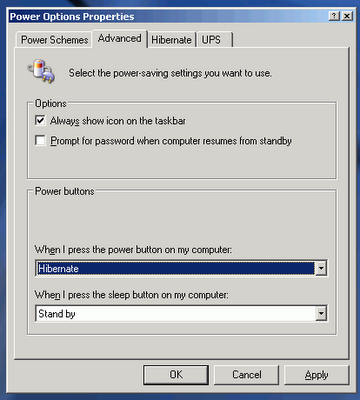
Next, click on the “Advanced” tab, which will allow you to set what your notebook does when you hit the power button. For “When I press the power button on my notebook,” select “Hibernate” from the pull down menu.


 So I went to Half Moon Bay with a partner at my firm and a group of summer associates. The event was pretty decent and unlike most of the other events like go-karting and nice dinners, so it was a welcome change. I liked the drive up Highway 1 so much that I went back again this morning.